3-Way Toslink Optical Audio Selector Switch – Manual, No Power Required
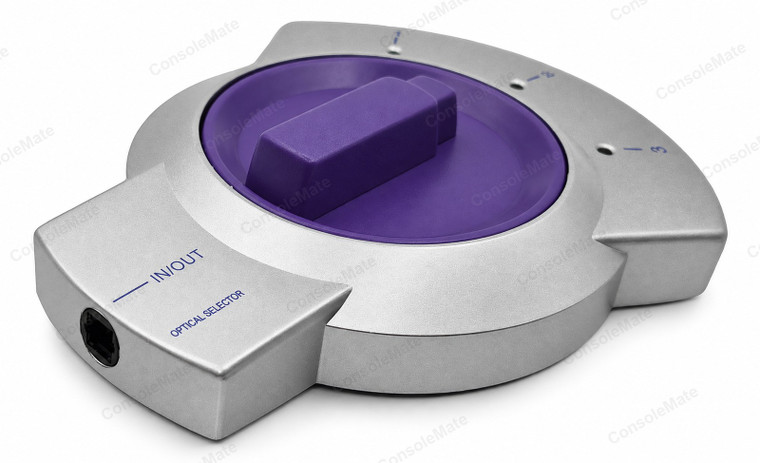
Most televisions, sound bars and amplifiers give you exactly one optical input, and that is the problem this solves. Plug your games console, your set-top box and your CD or Blu-ray player into positions 1, 2 and 3, run a single optical lead from the IN/OUT socket to the amplifier, and change source by turning the wheel instead of crawling behind the cabinet to swap a cable. Optical connectors are not built for daily plugging and unplugging, and this is what stops you doing it.
Key product details
- Three optical sources into one input – console, TV and streamer all stay plugged in, and you turn the wheel to pick one
- The common socket is marked IN/OUT, so it also runs the other way: one source out to three devices, one at a time
- Completely passive – there is no power lead, because it does not need one. The wheel physically redirects the light path
- Because it simply redirects the beam it passes whatever your source already sends, including stereo PCM, Dolby Digital and DTS, unchanged
- Four full-size Toslink (EIAJ) sockets: one marked IN/OUT, three marked 1, 2 and 3
- A small window beside each numbered position lets you see the red optical light, so you can tell at a glance which input is live
About this item
It is a mechanical switch, and that is the feature, not a compromise. There is no power supply, no chip and no firmware – the wheel moves the light path from one socket to another. Nothing has to wake up, nothing has to re-sync, and there is no box drawing power all day. It also means the switch has no opinion about your audio format: it is not decoding or converting anything, so a Dolby Digital or DTS bitstream arrives at the amplifier exactly as the source sent it, the same as stereo PCM.
The common port is silkscreened IN/OUT, so the unit is happy running in either direction. Used the usual way it is a three-into-one selector. Turned around it is a one-into-three distributor: feed it from a single source and send that signal to whichever one of three amplifiers, sound bars or headphone DACs you want listening at the time. It switches rather than duplicates – one path is live at a time, which is what you want when the three devices are alternatives rather than a pair you drive together.
Beside each of the three numbered positions there is a small window. Optical audio travels as visible red light, so when a source is running you can see which position is the live one without turning the amplifier up to find out. All four sockets are full-size Toslink (EIAJ) – the square connector with the bevelled corner – so standard optical leads go straight in.
Need to feed two devices at once instead of choosing between three? That is a splitter, not a switch – see the Toslink optical splitter, 1 in 2 out. To join two optical leads into a longer run, use the Toslink coupler, and if one end needs to be the small 3.5 mm mini-Toslink plug, that is the mini-Toslink adaptor.
Complete your setup
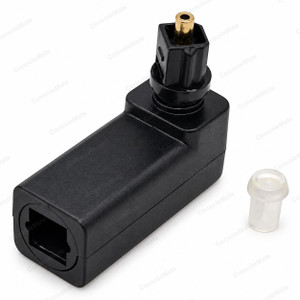
Tight clearance at a full-size Toslink port? See our swivelling right-angle Toslink adapter. Check clearance and connector shape; optical leads are still separate.
Choose only what your setup needs. Linked items are sold separately.